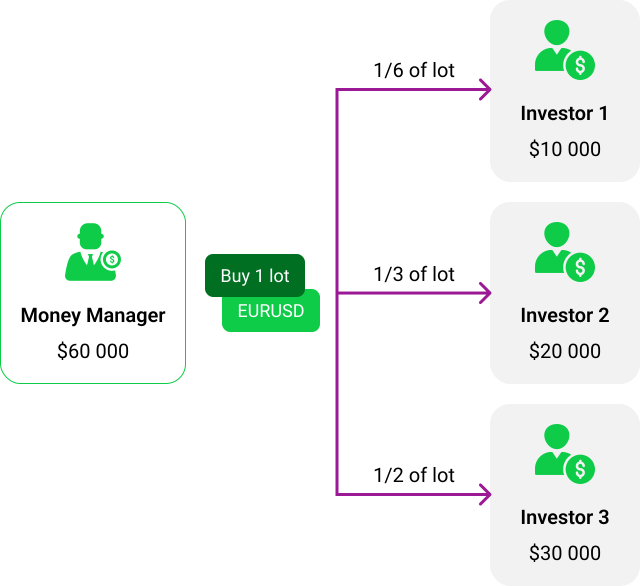
Takeprofit Easy Multi Account Manager software is organizes mini-hedge funds on MetaTrader.
Multi account manager MT4 /MT5 assists brokers in attracting professional traders and those who don’t want to spend time on trading but are ready to invest their funds.
Takeprofit MT5 and MT4 MAM allow fund managers to simultaneously manage multiple investor accounts.
MetaTrader MAM (multi account manager MT4 and multi account manager MT5) is a software solution provided by fx brokers to their clients. It allows a broker’s most efficient traders to manage multiple accounts belonging to the broker’s other traders from a single interface.
MetaTrader multi account manager functions as a bridge between the money manager’s trading account and investor accounts. It enables real-time replication of trades from the money manager’s account to multiple sub-accounts of his investors.
Money managers and investors accounts are kept inside MetaTrader. That mean that:
1) Money managers can use all of their tools: EAs, robots, dealers.
2) Trading accounts can be reviewed by regulators.
Our multi account management app is developed with keeping maximum reliability and speed of execution in mind.
It can simultaneously distribute trades to up to 20 000 investors.
EasyMAM provides absolute calculation accuracy. Even a trading volume of 0.000001 lots will show the correct profit.
The solution offers a “hide open trades” feature.
Does not collect or store customer personal data.
Lightweight. Our multi account manager software is not a plugin. It can’t overload your server or freeze it.
Сompatible with third-party bridges and plugins.
Profits are calculated online.
EasyMAM provides interfaces for investors and money managers. The interfaces enable traders to invest and earn right on your website:
Traders log into EasyMAM on your website using their MetaTrader login and password.

The interfaces are customizable to align with your brand guidelines and website. We can modify colors, fonts, and logo to suit your preferences.

After you sign up you get access to the trader interface.
Installation of MT5 and MT4 MAM solutions can be performed by our support team to ensure smooth and trouble-free integration of the service. This can be done within one day.
Along with multi account manager software you get these paid support plan features for free:
Email and Telegram support during business hours
Emergency 24/7 support hotline
Updates to ensure that MAM Forex work with the latest version of MetaTrader and Windows
Developers devoted to finding solutions to your personal needs
Takeprofit Multi Account Manager turned out to be the best one for our purposes. The most important factor is the option to reflect all MT5 account trades both for the master and slaves. We also appreciate the fact that a WL broker can see all his MAM accounts in his own GUI. What we would like to see is an option to attach slaves automatically if a new account is opened in a slave group.
The most valuable tech support feature is its availability via Skype and willingness to help and solve the problems. Sometimes we need to wait. That happens when a question is more technical, and there is a need to discuss it with the IT department.
Chris Dankowski, Chief Business Development Officer at Match-Trade Technologies
Takeprofit is flexible and fast in product customization and tech support. Its EasyMAM is the first PAMM product that we work with. The solution is easy to understand and use. Most importantly it is highly customizable which is important for us and our clients. However, the occasional bugs are disruptive to our business. For example, one of the issues made us stop trading for several days. This part should be improved – when our client base gets bigger we cannot afford such downtimes.
Velos Technology
EasyMAM fully met our business requirements. The solution allowed our master account to work seamlessly, and workflow has simplified our work. What might have done our life simpler is a demo set on a third-party demo server.
Amook, CTO at FX Broker Tools
When choosing a multi account manager we also considered the Trading Room solution by B2Broker. What made us pick Takeprofit EasyMAM was that our client was using the same software. And in addition, Takeprofit had a reasonable pricing plan.
What we like the most about the tool are the accuracy in order distribution and linking and unlinking investors to money managers through a GUI. What we lack is Arabic support.
Ouais Wajhani, CEO of Arab Platform Capital
That is such a pleasure to work with real professionals. Minimum questions, maximum results.
Tenko FX
Takeprofit Multi Account Manager has the best speed we could get on the market to get transactions placed in each slave account. And the most valuable in tech support is the way how efficiently the guys respond and how fast they solve our problems. As well as their patience and understanding of what we need. I think the support team is doing a great job.
Brokerage name not disclosed, as per client’s request
Important to note before attaching investors:
To attach an investor account to a money manager account, follow these steps:

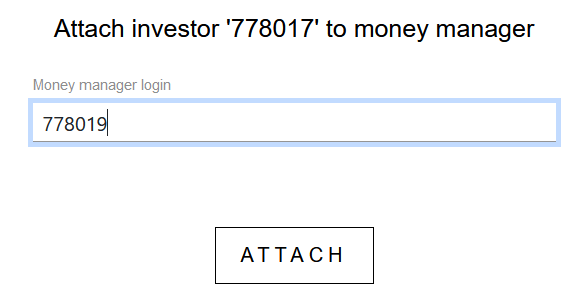
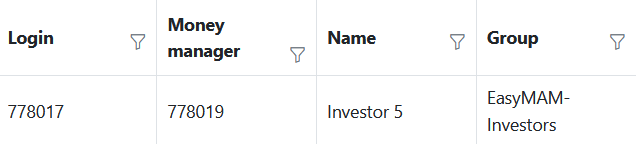
After a click on “Attach” button, EasyMAM service will start the process of “attaching” the investor account to its new money manager:
When an investor is attached, his account receives the money manager’s account ID:
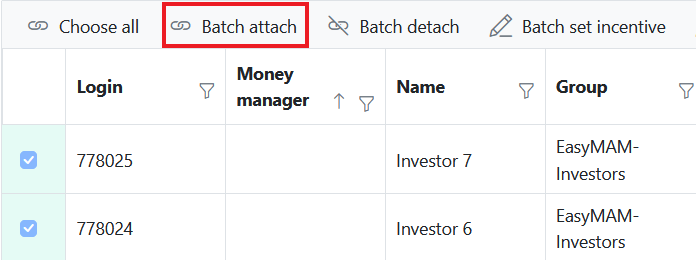
For bulk attachment, the investors should be filtered to display only the detached ones.
Click the “Batch attach” button and enter the ID of the money manager account to which these investors must be attached.
While attached to the money manager account, all investor accounts have the ability to receive new trades, earn profits, and experience losses.
If an investor wants to prevent any further trading activities on their funds, the investor account must be detached from its associated money manager. To detach an investor account, follow these steps:
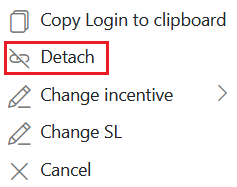
If an investor account has open positions, MAM forex will close them for that particular investor account and partially close the money manager account’s positions. The partial closure will be equivalent to the volume of the detached investor account positions.
When detaching an investor account, the position volume can be rounded up or down. The rounding is performed according to the minimum step of the Symbol volume.
As a result, there are three possible ways to detach an investor account:
Examples of investor detach with partial closing on money manager round UP and DOWN
If an investor is detached with partial closing on money manager round UP, the investor will get a closing volume of 1.33 lots from the money manager’s position.
If an investor is detached with partial closing on money manager round DOWN, the investor will get a closing volume of 1.32 lots from the money manager’s position.
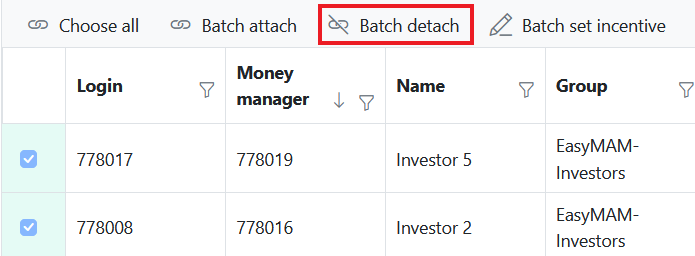
For bulk detachment, the investors should be filtered to display only the attached ones. Click the “Batch detach” button and choose the detach mode. Then, click the “Detach” button.
If this field stays checked, the balance of the money manager and investor accounts will differ after Stop Out is applied. This occurs because the Money manager’s negative balance will be compensated according to this rule.
The Stop Loss function restricts the amount of money that should be present in an investor’s balance at all times (in the currency of the account’s balance). An automatic detach occurs whenever the current equity falls below the Stop Loss value.
To set the Stop Loss for an investor account, follow these steps:

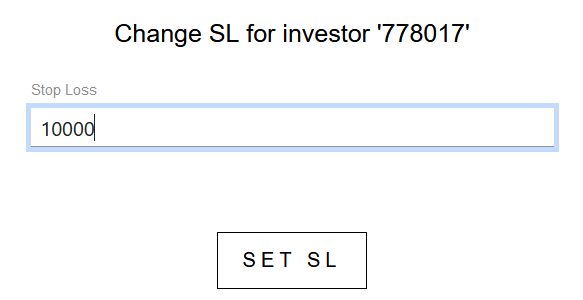

For bulk setting of Stop Loss, investors should be filtered to display only attached ones. Click the “Batch set SL” button and set the stop loss amount.
Click the “Set SL” button to apply the settings to the selected investor accounts.
After clicking “Set SL”, the specified Stop Loss value will be recorded for the specified accounts in the SL column. If the Stop Loss amount exceeds the current equity of an investor account, it will be automatically detached.
It is possible to use a negative value to set SL. In this case, the investor account will not be detached even if it has a negative balance.
EasyMAM offers the option to reward money managers for trading performance.
The reward (incentive) calculation in Easy Multi Account Manager MT4 /MT5 follows a high-water mark logic. It means that the incentive is paid only if the overall profit of all the money manager’s trades is positive since the last incentive payment.
As money manager accounts cannot have their own money, the incentive will be paid to a designated incentive account owned by the money manager.
If you create an incentive account, it can belong to any group, but it must be added to the manager’s group list to make the incentive payment process possible.
Here is an example:
It is possible to set up to 3 incentive accounts for each investor account:
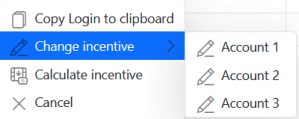
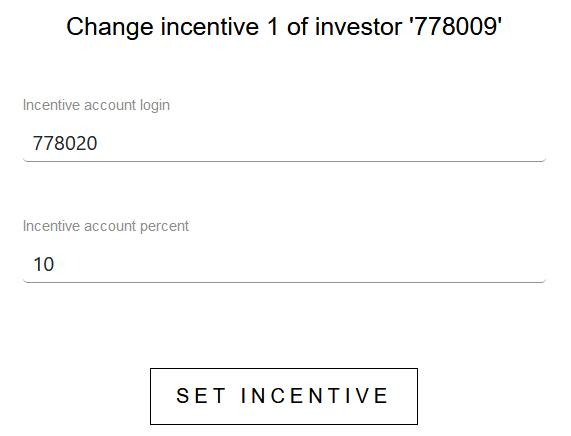
Once configured, the current incentive value will be in the “Incentive” tab in the GUI:
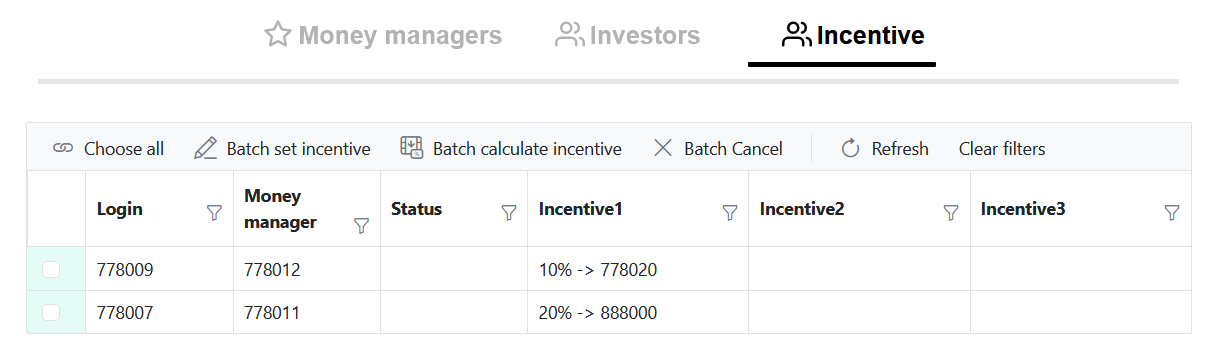
For bulk incentive setup, investors should be filtered to display only the attached ones.
Click the “Batch set incentive” button:
Enter the incentive account index, incentive account login, and incentive account percent:
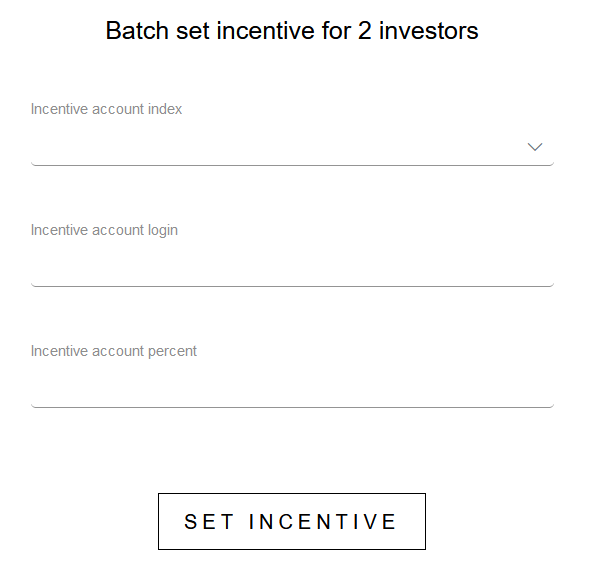
Then click the “Set incentive” button to apply the changes.
To calculate incentive, choose the investor account in the “Investors” or “Incentive” tab. Right-click on the chosen account. Click the “Calculate Incentive” button in the menu:
It is possible to see the incentive operation in the trading history of incentive account after the payment:
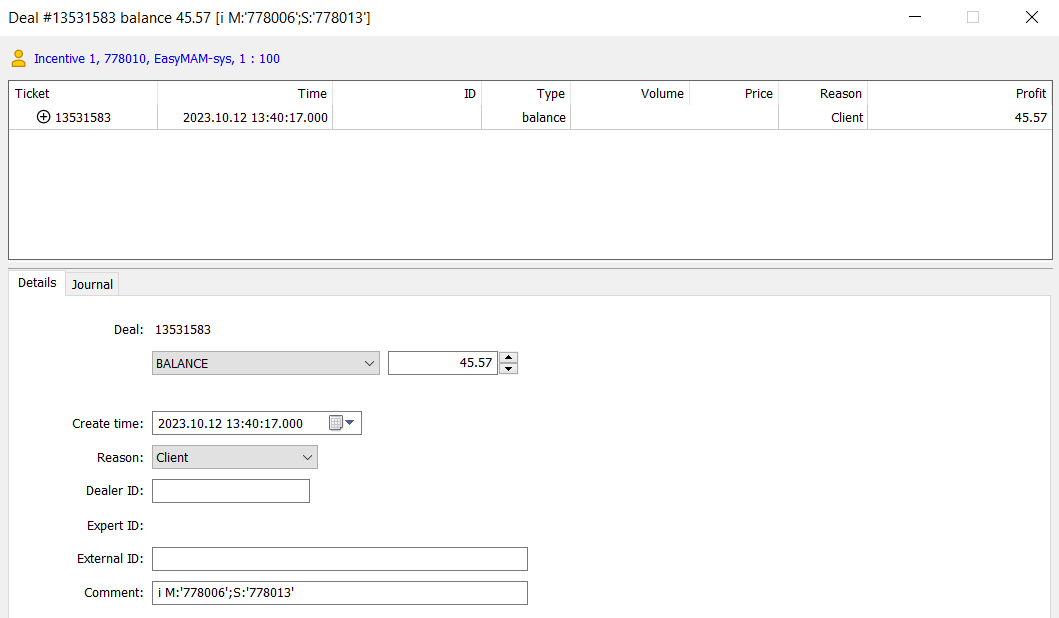
It contains the following comment:
i M:’money manager_account_id’;S:’investor_account_id’.
Example: i M:’17500′;S:’17400′
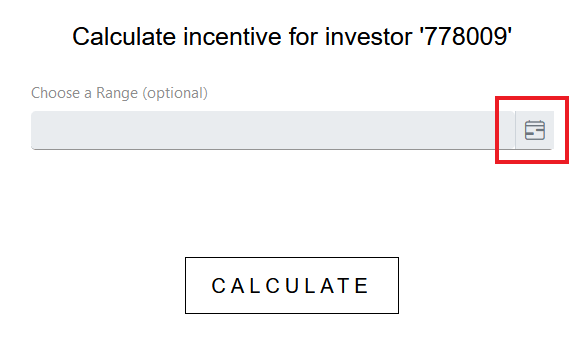
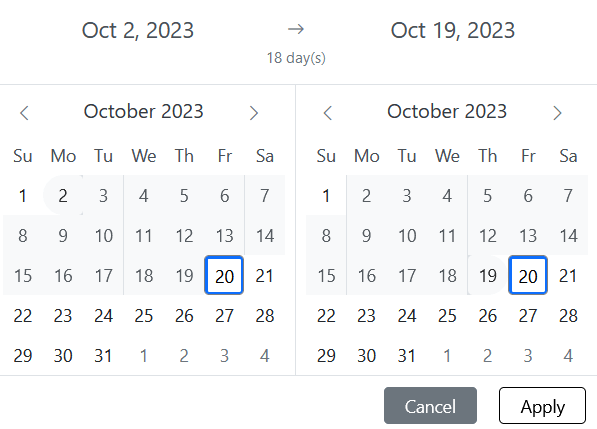
Starting from version 5.86, EasyMAM supports the function of calculating incentives for a specified interval of days.
To calculate the incentive for a specified interval of days, follow these steps:
The main purpose of a multi account manager MT5 and multi account manager MT4 is to allow professional money managers to efficiently trade and manage multiple accounts from their single master account. This capability can attract novice traders and contribute to the growth of trading volume.
No, MT5 and MT4 MAM software is designed to be user-friendly and easy to navigate. The interface is intuitive and straightforward, and users can easily find the features they need. In addition, the software comes with a comprehensive help file that provides step-by-step instructions for using all of the features. Overall, MAM software is not difficult to use. Our technical support team is available 24/7 to help you with any technical difficulties you may be having.
Both MetaTrader MAM (multi account management) and PAMM (percentage allocation money management) have their own advantages and disadvantages.
PAMM is usually used for such systems where investors invest their money in a “common pot” (such as an investment fund), the manager trades on this common pot, and profits (or losses) are distributed among all investors in proportion to their investments. For example, if one invested $100, and the second invested $200, then the first will receive twice as much profit or sustain twice as big a loss as the second since the second has invested twice as much.
MAM is a system where investors entrust the management of the funds in their account to another person so that this person can conduct any transactions directly in the investor’s account. In general, there are several separate accounts under the supervision of a money manager, and they decide which transactions will appear on which account (for example, they may choose to open a deal on all accounts of the same size, or proportional size, or open it on one, but not on another — all of this is at the discretion of the money manager).
It’s important to note that the perceived goodness or badness of an MAM plugin or app depends on the quality, security, and features offered by the specific implementation. Additionally, user preferences and requirements play a significant role in determining which solution is better suited for a particular situation.
However, a plugin is software that is installed on the server, so it occupies the server’s space, and in case many calculations are done, the server may freeze.
Multi account management ensures accurate trade allocation through advanced algorithms that distribute trades proportionally based on each sub-account’s equity. This system automatically adjusts for account size and risk preferences, ensuring that each client receives a fair and precise allocation of trades. Additionally, MAM typically includes real-time reporting and monitoring tools to track and verify the allocation process, ensuring transparency and accuracy.
Other money management solutions
2013—2025
Forex broker software
We are a fintech software developer. Our services focus on forex broker software development, system integration, and health audits of brokerage systems.